
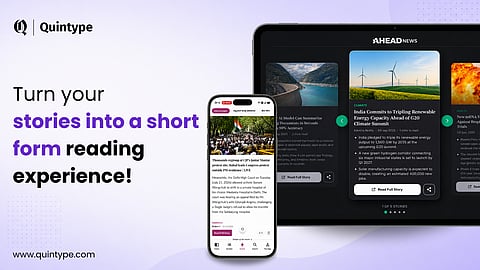
Turn Your Stories Into a Short-Form Reading Experience
Attention is becoming harder to hold in a digital world filled with constant information and distractions. A CBS News report exploring changing attention spans highlights how people are spending less time focused on a single task.
Not everyone has the time to read every news story in full. As a result, people are increasingly drawn to content that is quick and easy to consume, making short-form experiences an effective way to capture attention and deliver information.
This creates a few challenges for both Readers and publishers:
Catching up on multiple stories can mean opening and reading several full articles.
Readers may not always know which stories are worth spending more time on.
Scroll-native audiences expect quick and seamless ways to consume updates.
Creating a separate short-form experience can add to editorial effort.
The challenge isn't about replacing long-form journalism with shorter content. It's about giving readers a quicker way to catch up, discover what matters and decide when to dive deeper, while helping publishers create a more engaging experience on their website and app.
That's where shorts come in.
Bringing Shorts to Both Web and Mobile Apps.
Readers don't consume news in just one place. They might be browsing a publisher's website during the day or checking their news app while commuting or taking a short break.
With Quintype, publishers can now bring a Shorts experience to both their websites and mobile apps, giving readers a quicker, more engaging way to discover and consume news, wherever they are.
On the web, readers can access Shorts through a floating icon and move through a feed of stories without having to navigate through multiple article pages.
On mobile apps, Shorts gets a dedicated space, allowing readers to browse through stories in a continuous, scrollable experience and quickly catch up on the latest updates.
Across both platforms, readers can get the key context of a story and choose to dive into the full article when they want more.
The experience may look different across web and mobile, but the idea remains the same: give readers a faster way to catch up, discover more stories and go deeper when something catches their attention.
Power Shorts Without Creating More Work
Launching a new content format often comes with an obvious concern for publishers like, will this create another editorial workflow to manage
With Quintype Shorts, it doesn't have to.
Shorts is powered by the stories publishers are already creating in Bold. It uses key elements from an existing story, such as the hero image, headline, and summary, to bring that story into the Shorts experience. With AI-generated summaries, publishers can create the content Shorts needs without having to write the summary manually.
This means publishers don't need to create a separate version of every story just for Shorts. They can continue with the workflow they already use, while giving the same content another way to reach and engage readers.
More Opportunities to Monetise the Shorts Experience
Shorts also gives publishers another space to bring in advertising.
Since readers move through multiple stories within a single Shorts experience, publishers can place ads or widgets between the content.
On the web, widgets can be added within the Shorts view. On mobile apps, publishers can configure ads to appear between Shorts cards.
This gives publishers an additional ad inventory within the Shorts experience while readers continue scrolling through content.
Key Benefits

1. Help readers catch up faster
Give readers a quicker way to go through important updates without needing to read every story in full.
2. Make it easier to discover stories
Help readers understand what a story is about before deciding whether they want to spend more time reading it.
3. Offer a more seamless reading experience
Let readers move through multiple updates in one continuous experience instead of opening articles one by one.
4. Reach readers across web and mobile
Bring the Shorts experience to both platforms and offer readers another way to consume news wherever they are.
5. Do more with the content you already create
Use existing stories to power Shorts without introducing a completely separate editorial workflow.
How It Works
1. Create a collection named Shorts in Bold. You can then create new stories or use existing stories to power the App Shorts experience by adding them to this collection.
2. Add a summary element to the story and publish it. The story’s hero image, headline and summary will be used for the short experience.
3. Readers can browse the Shorts and open the full story when they want to know more.
In a Nutshell
By now, you know that not every reader wants to consume news the same way. With Shorts, you can give your readers a quicker and more engaging way to catch up on stories, while helping them discover the content they may want to explore further. And because the experience works across both web and mobile apps, you can keep readers engaged wherever they choose to consume your content.
Want to explore how Shorts can work for your publication? Get in touch with us.